Loops You Can Trust

The best way to manage agents starts with a three minute egg.
Suppose you run several restaurants that serve breakfasts to big bursts of morning traffic. Every customer orders the same meal: an egg, toast, and coffee. They expect all three to arrive together, warm, at a predictable time, and with consistent quality. The egg takes the longest. Toast can burn while you wait. Coffee gets cold. A delay in one step holds up the whole plate. And of course, we need to make a profit.
Where would you start? What would you measure? How much work would you keep in flight? Where would you inspect quality?
This is the question Andy Grove opens with in High Output Management. He uses this imaginary breakfast factory to explain limiting steps, throughput, quality control, and managerial leverage. And these concepts are surprisingly useful for managing agents and building agent loops you can trust.
I’d done the IC → manager thing a few times before joining Cursor, and the skills and agents I’ve been building have grown out of treating agents like brilliant new hires with amnesia. What surprised me was just how similar managing a team of agents is to managing people. I kept coming back to the same questions: What’s the bottleneck? Which work can happen in parallel? Where should verification happen? Which bugs can reach our users? Where does my attention have the most leverage?
Being a great agentic engineer is actually just being a great manager to someone who is smarter than you in some domains but has significantly less business sense than you.
Your job primarily, is to coach and mentor the subordinate in the ways and context of the business, and help narrow down the infinite possibilities of a genius mind into one optimal path that is best for the business. You are channeling the productivity of a genius.
Then, you must let go and pass on the responsibilities of technical implementation to your subordinates.
You are patient with their mistakes, hold a high standard for what is acceptable, and ultimately own the outcome of the end product.
You design systems, policies and impart memories that give him your great sense of the business, your wisdom of being in the field for decades. You are a mentor to the gifted young.
You understand that almost everything that is beautiful is a product of iteration, and you partake in a cycle of feedback and iteration with your genius subordinate that allows him to improve and go further.
That is how you become a great agentic engineer, by first being a great manager.
My amusement is the realization that people who are frustrated by their agents and can’t seem to get anything useful out of them are just bad managers.
In my previous post, I wrote that the bottleneck with agents is verification. Since then, I’ve had these systems running constantly and have learned a lot more about what makes a loop dependable enough to leave alone.
The Limiting Step
Section titled “The Limiting Step”On my second day at Cursor, I got a surprise DM from my manager:
“we need your help. glass (aka Agents Window) performance isn’t great, and you know a thing or two about React. want to help?”
“oh and btw, glass launches in a few days. good luck”
Well, shit. I didn’t know anything about the codebase, so how am I going to manage that? Was I about to speedrun getting fired?
I opened Chrome DevTools and immediately started looking. Cursor is an Electron app, so I could use tools I was already familiar with. But memory was already elevated enough that the app would sometimes hit Electron’s 4gb limit and crash before I could finish a trace. The crashes started piling up, and so did my dread. Asking agents wasn’t helpful either. They would just confidently state things and my BS meter kept going off.
I was faced with two options: keep brute forcing this by hand and resign myself to the permanent underclass, or figure out how to productively bring agents into the process.
Back in April 2025, when people still coded by hand, I started building a toy MCP for React Compiler. MCP ended up being the wrong medium, but the idea I had was that agents should get the same signals human engineers use to write good code: compiler diagnostics, lints, static analysis, and so on. Agents need to be able to see what I see, and use the tools I use.
The performance problems plaguing the Agents Window at Cursor were a new opportunity to prove this hypothesis. I needed to give agents access to the same tools I had, and I needed to do it quickly.
So I quickly put together a /control-glass skill for Cursor. It let agents launch a dev build with the Chrome DevTools Protocol enabled. This allowed agents to click and type, inspect the accessibility tree, take screenshots, record video, throttle the CPU or network, capture CPU profiles, and take heap snapshots.
My experience fixing perf issues showed me what the agent needed access to, what could go wrong, and what a good result looked like. But now, an agent could reproduce the issue, profile it, make a change, and run the same measurement again. Every future agent got those capabilities for free.
Before you start thinking about loops, you must teach agents to verify that their work is correct and meets the quality bar. Without a way to trust that the work was done correctly, running loops naively just creates compounding slop and more work for humans, who already have less bandwidth and more distractions than ever before. Verification has become the limiting step, or long pole of software development: it’s the stage that constrains the output of the whole loop.
In the breakfast factory example, the egg takes three minutes, so meals must be scheduled around it. Making toast and coffee faster will not deliver the breakfast sooner.
In code, reproduction and verification take the longest amount of time since they often rely on manual human oversight. Giving agents this capability allows you to significantly shorten the time needed, and frees you - the most precious resource - up to build and run multiple loops at the same time.
Building Trust In The Loop
Section titled “Building Trust In The Loop”Our dev builds of Cursor shared ports, processes, and local user data. Two agents trying to use the same build would interfere with each other in hilarious ways, so I quickly had to add worktree support. Each agent could now get its own checkout, build, ports, browser state, and isolated Cursor instance. Several agents could investigate different problems in parallel without colliding.
Now I could run a bunch of agents at the same time. But while their fixes now worked thanks to /control-glass, it was still low quality code. Parallelization just gave me more to review and discard. Throughput had increased, but at the cost of more rework.
Managers are measured by what their teams get done. Agents make this idea feel very literal. You can increase the output of your team by hiring more people, or asking them to work faster or for longer hours. But you can also do so by training them with new skills and equipping them with better tools.
High Output Management calls this idea “managerial leverage”. Applied to agents, it’s the idea that humans can do the work once by authoring reusable skills and tools, and increase the output of your whole agent team.
“Give me a lever long enough, and I can move the world”. A team of agents armed with high quality tools, skills, and ways to verify its work, can do projects that would otherwise have taken humans months.
I never set out to build pstack, my personal set of skills for rigorous engineering with agents. I just started turning every recurring failure mode into a skill: reproduce the bug before touching the code, form several hypotheses and eliminate them, write the failing test first, inspect the blast radius outside the diff, compare alternatives before choosing one, and capture the real product before and after. The agents improved because their instructions carried the scars from previous runs.
pstack is a set of skills that you can run as part of your loops to make agents do work with more engineering rigor. It ships with powerful playbooks that agents can work on for hours at a time to autonomously complete big tasks, and they produce artifacts like decision logs and tests that you can review later.
Whether you use pstack or build your own set of skills, observing where agents struggle and building systems that help them succeed is now a big part of the job of being an engineer. Some of this will look like skills and rules, and some of it will look like refactoring and choosing architectures where agents do the right thing by default.
start with nothing. don’t download any plugins or skills. no AGENTS.md either. just prompt and observe the failure modes. codify them into skills when they repeat. even better, write lint rules or structure your codebase so certain mistakes are impossible.
every chef has their own set of knives, you should too
or just use pstack heheh
— @poteto
What If Loops Could Run Themselves?
Section titled “What If Loops Could Run Themselves?”Now that agents write most of the code (and so much of it) maintenance has become a nightmare. And even with pstack, agents still do nothing unless I kick them off myself. I have to notice the problem, launch an agent, run a pstack loop, and watch the result. Entropy rises faster than you can contain it.
Then, Cursor launched automations in March. That was the missing piece! I could finally put pstack and /control-glass together as loops that run themselves. Software maintenance felt like the obvious place to try Automations first. Reports were already flowing through Slack, and the work naturally broke down into stages: triage the report, reproduce the bug, fix it, and verify the result.
So that’s what I built. I started with triage. The automation downloads attachments like screenshots and videos, analyzes them, and deduces from vague user messages which feature is being reported against. It also checks the reporter’s version, searches for duplicates, and looks through the code and recent history. When it finds a clear bug, it leaves behind a ticket and a handoff for the repro automation.
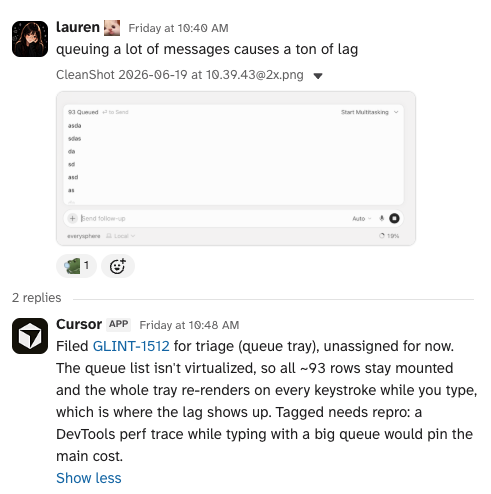
The Triage automation first figures out what is being reported and what feature(s) have issues
The repro automation waits for that verdict, opens a real Cursor build in the cloud, and follows the same path as the reporter. It has to hit the exact broken state twice and capture screenshots and video. That evidence becomes the input to the fixing automation.
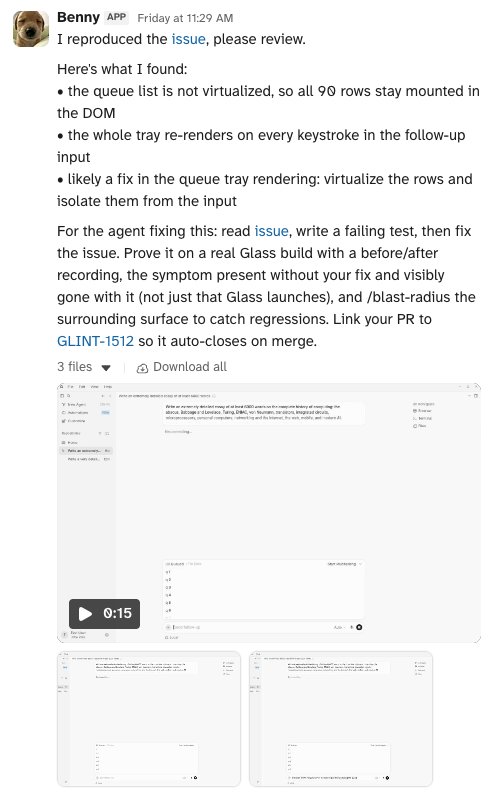
When the repro steps are clearly defined, another automation attempts to do so in the cloud with its own computer
Before the fix starts, the thread stays open for humans to correct or reject the repro. If no one objects and the root cause is clear, the fixing automation picks up the warm build and all the evidence from the previous step. It writes a test when it can, makes the smallest fix it can prove, runs the before and after, and opens a draft PR.
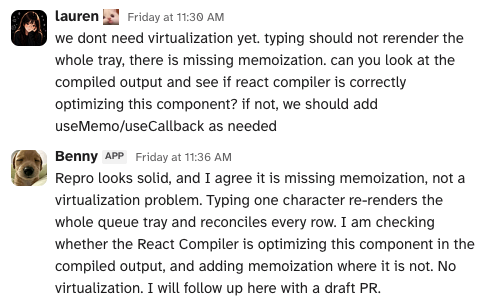
Humans provide feedback in Slack
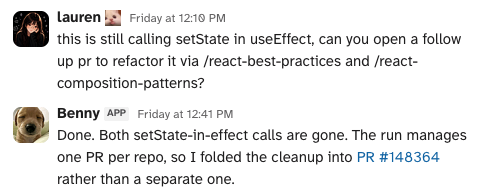
We will be cleaning up useEffects until we die
The repro and fix automations post screenshots and videos to increase trust. Humans can review these artifacts to quickly tell if the agent is fixing the right thing at all, and if it understood and fixed the bug correctly. This makes PR review much simpler, since I can devote the rest of the time to just looking at the code itself since I already trust that it works correctly.
Another thing the automations can do is verify work that’s already in progress. Sometimes a PR is already open but hasn’t landed yet. The repro automation finds it and runs the before and after to check whether it fixes the reported bug. If it does, it confirms it, giving more confidence to the author that it’s the right fix.
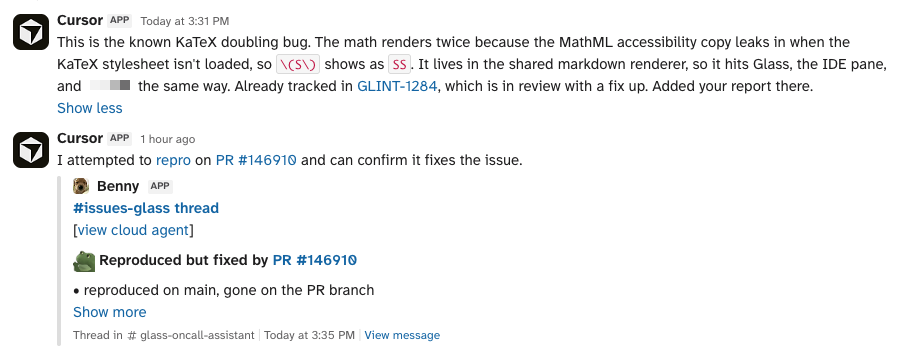
Nice, another PR already fixes this!
One key aspect of building trustworthy loops is that every stage can stop the line. The triage agent can decide it isn’t a bug and expected behavior, based on the research it does. The repro agent can fail to reproduce it. The fixer can decide the change is too risky. Those are all useful outcomes because they keep bad work from flowing into the next stage, where it gets much more expensive to correct.
Now one automation can feed the next without waiting for me to carry the context between them. Slack has become the control room where I can see the state of the whole line and jump in when something looks wrong. The pstack loop can finally start without me.
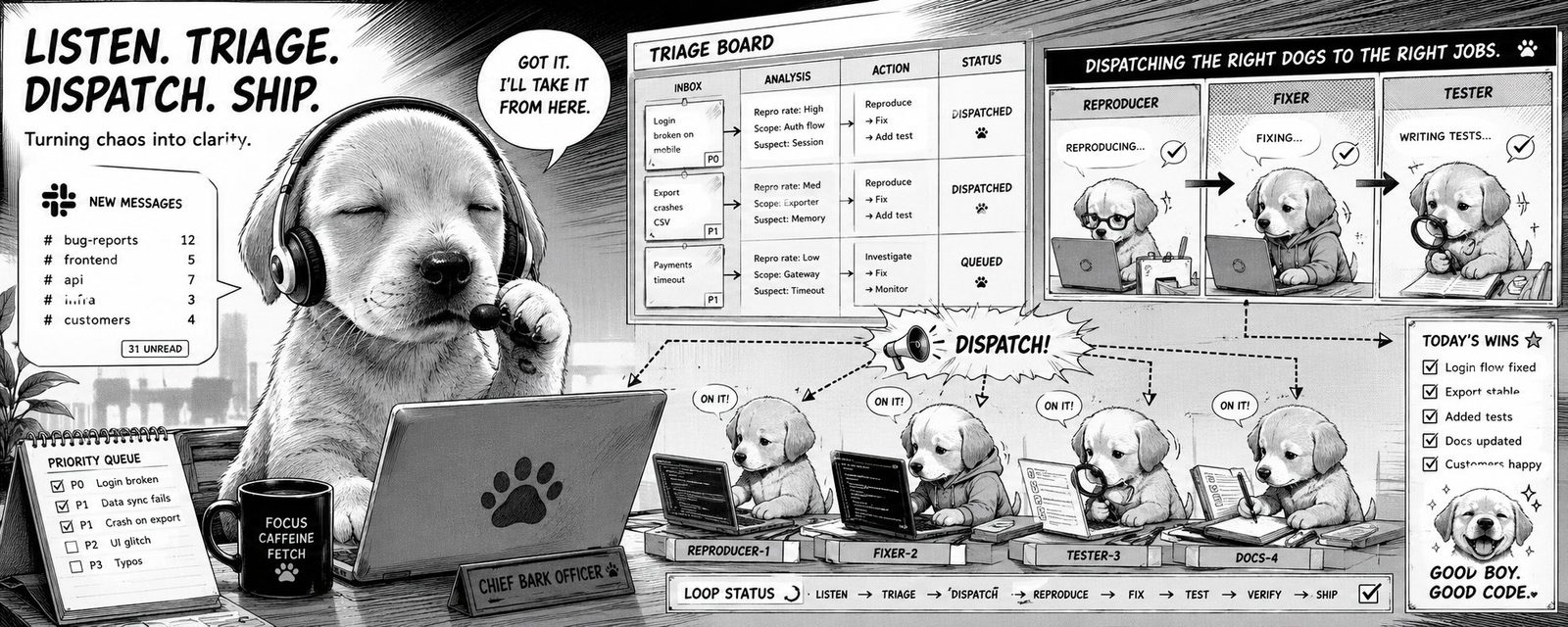
Adopt Benny today!
If you made it this far, as a reward I am also open sourcing example skills that you can use as references for your own Cursor Automations to build your own loops.
Just point your agent to the README and it’ll set this up for you.
Trust But Verify
Section titled “Trust But Verify”The phrase I keep coming back to is “trust, but verify.” I ask the same thing from agents in chat and from agents running inside Automations: show me your work.
“I fixed it” isn’t good enough. Show me the failing test and the passing test. Show me the before and after video. Show me the trace, the heap snapshot, or the screenshot. If the fix merged, run it again on main and show me that too. Often, I’ll build these patterns back into agent skills and make agents prove that they did the work right.
Artifacts, like screenshots or videos, beat a plausible sounding explanation which may be wrong. An artifact gives me something I can inspect and challenge myself. It also means I don’t have to replay the entire run to understand whether I should trust the result.
When I’m in the loop, I pay close attention to the chat, especially thinking blocks. It’s a great way to figure out what the potential failure modes are. That’s also how I decide whether a step needs an agent at all. If a script can do it deterministically, use the script. Agents are useful for the fuzzy parts: choosing hypotheses, interpreting evidence, and deciding when something needs human judgment.
For long runs, pstack’s /show-me-your-work skill keeps an append only decision log. Each row says what the agent decided, why, what evidence it used, and what happened. At the end it checks that log against the transcript, and it also spawns an agent from a different model family to review its own workflow. I can review the important decisions without reading the whole session.
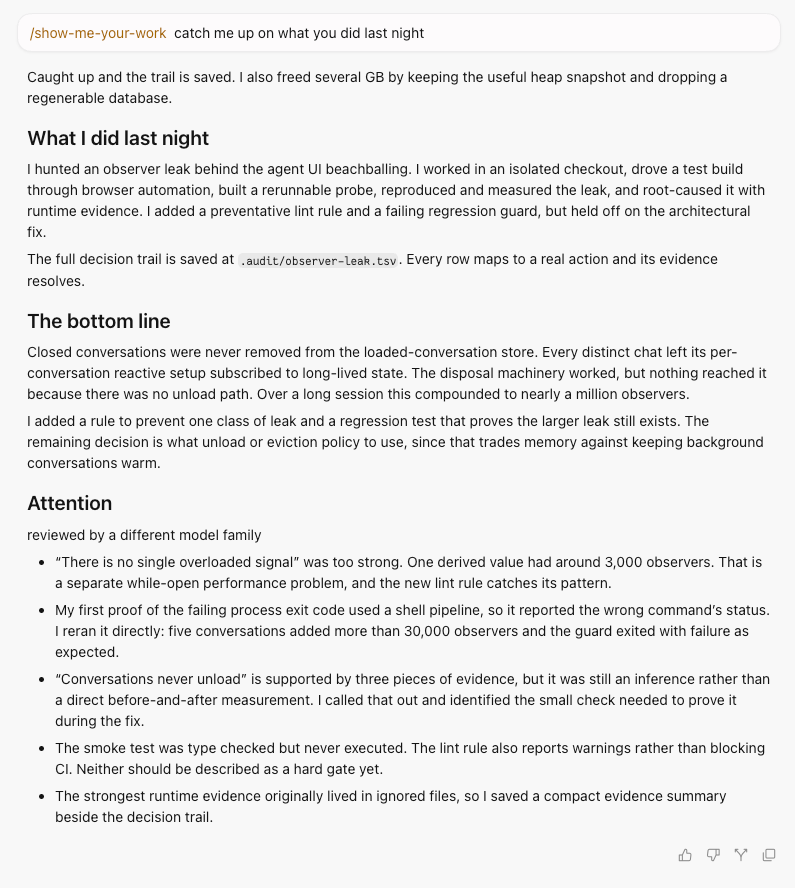
/show-me-your-work
A classic example of artifacts being a lever for your time is migrating code from one language or framework to another. You could brute force the migration with hundreds of agents, but then you have hundreds of agent written changes to verify.
pstack calls this Build the Lever. Do the first unit by hand to learn the recipe, then have the agent write a codemod for the mechanical parts and a checker that proves the output. A reviewer can read and rerun those tools.
The agent can build the lever for itself. When I see one repeatedly doing something by hand, I have it write the tool or skill it wishes it had. Every future run inherits it.
This is how I get comfortable giving agents more autonomy. The loop does the work, checks its own work, and hands me the proof. I can spend my review time on the parts that still need human judgment.
Lessons From A Real Migration
Section titled “Lessons From A Real Migration”A recent lesson in verification came from migrating our shared UI library to StyleX. The PR was almost 400K lines, although much of that was generated verification evidence. My agents built deterministic scripts that compared the computed output of the old SCSS against the new StyleX. The generated CSS shrank from more than 30,000 lines to around 6,000, and the states we captured reached visual parity.

Then we dogfooded it.
The original migration was pixel perfect, but dogfooding still found z-index bugs, global class consumers, and !important specificity fights hiding in all that styling at a distance. It was painful, but necessary. StyleX forced the spaghetti into the open where I could finally untangle it. The size of the PR made every discovery expensive.
So I turned the experience into training for the next loop. The StyleX automation now migrates one leaf component in Cursor at a time. It looks for warning signs before choosing a component, including unclear ownership, dynamic class assembly, relational selectors, stacking, transforms, and specificity fights. Before deleting a class, it searches the repository for behavioral, test, automation, and consumer dependencies.
For every component, the automation captures computed styles before and after across light, dark, and high-contrast themes. It covers hover, focus, active, disabled, and component-specific states. It records the interactions, pairs the screenshots, and asks another agent to inspect the media. A failed build or parity check ends the run.
Over the last few days, the automation has migrated one component per day. Each PR is small and includes many screenshots and videos. The giant migration taught the loop how to perform the remaining migrations safely.
The lesson was simple: catch defects at the lowest value stage. A failed check on one small component is cheap. A regression found after a giant migration lands is expensive.
Building Your Team Of Agents
Section titled “Building Your Team Of Agents”If you want Michelin stars, your team has to be cracked. The head chef can’t personally cook every plate. They design the menu, train cooks, set up the stations, inspect dishes at the pass, and fix the system when service falls apart.
Agents were supposed to make our lives easier. But a hundred agents waiting for prompts and dumping slop PRs into your lap is keeping us busier than ever.
A few months ago, I was asking how many agents I could run at once. Now I ask what evidence a loop produces, where it can fail fast, which failures make it safer, and where my time has the highest leverage. I want to leave a loop running and understand exactly what happened when I come back.
- Do the work by hand first, so you know what good looks like.
- Give agents the same tools and signals you use.
- Make every stage prove its work and stop when it doesn’t meet the bar.
- Read the transcripts and turn recurring failures into tools, skills, or evals.
- Make loops autonomous only after it earns your trust.
When you’re ready, you can build these systems with Cursor Automations, with pstack as a head start.
If you thought any of this was useful, I highly recommend reading High Output Management. Thanks for reading!